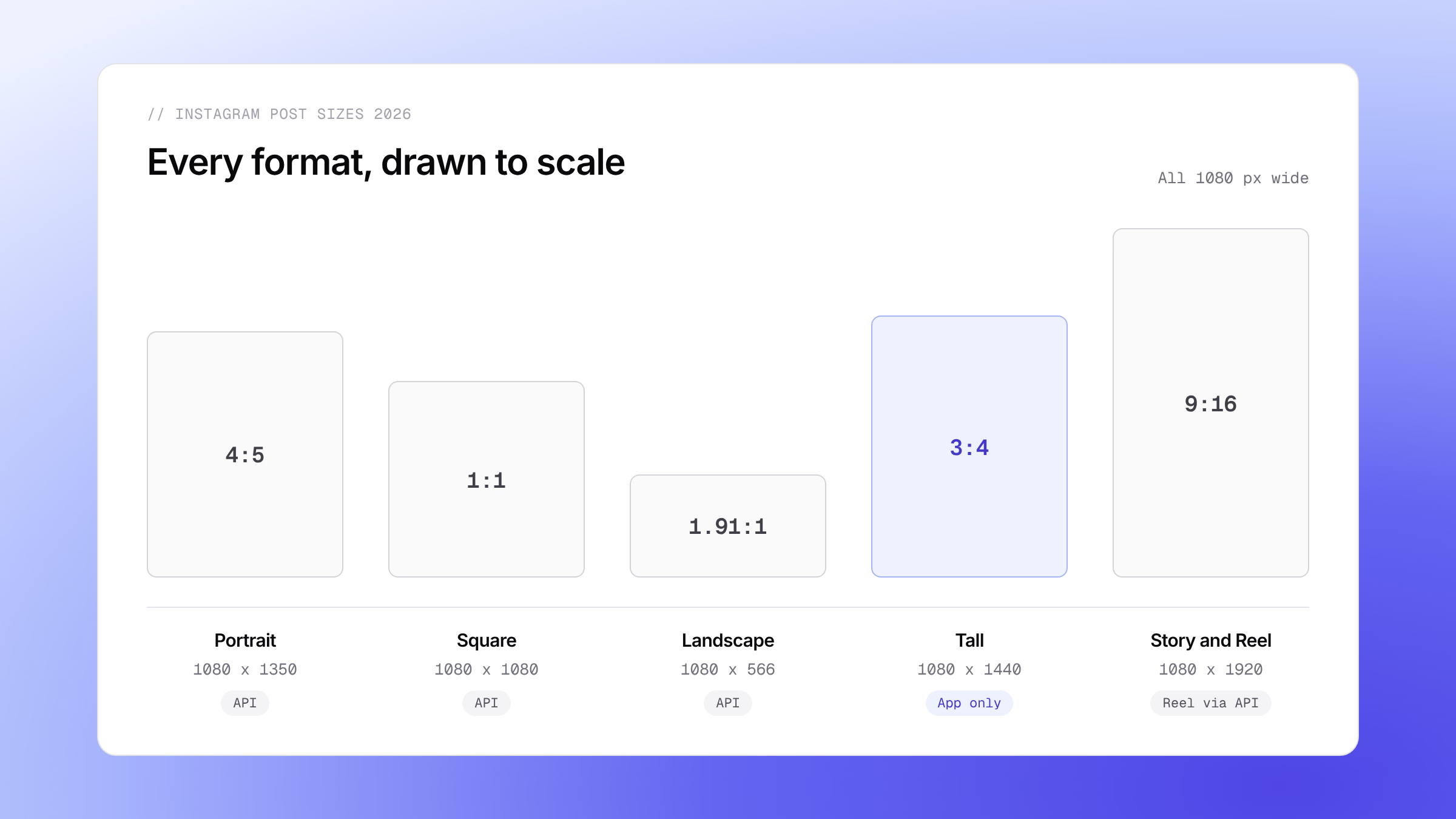

The best Instagram post size in 2026 is 1080 x 1350 pixels (4:5). It fills the most space in the feed and every route accepts it, including the Instagram API. The app now also takes 1080 x 1440 (3:4), which matches the taller profile grid, but the API rejects that size.
Feed, carousel, Story, Reel and profile picture sizes are below, with the file rules that decide whether a post publishes or fails. If you post from your own product, the API section covers the limits a social media publishing API has to respect.
One API instead of the Graph API plumbing. InvisibleAPI is one job-based API for Instagram and X. Connect the account, create a publishing job, poll it until it reaches published.
Get API keyInstagram post sizes at a glance
| Format | Size in pixels | Aspect ratio | Through the Instagram API |
|---|---|---|---|
| Portrait feed post | 1080 x 1350 | 4:5 | Yes |
| Square feed post | 1080 x 1080 | 1:1 | Yes |
| Landscape feed post | 1080 x 566 | 1.91:1 | Yes |
| Tall feed post (app only) | 1080 x 1440 | 3:4 | No, crop to 4:5 first |
| Carousel slide | 1080 x 1350 or 1080 x 1080 | 4:5 or 1:1 | Yes, 2 to 10 items |
| Story | 1080 x 1920 | 9:16 | Not covered here |
| Reel | 1080 x 1920 | 9:16 | Yes, videos publish as Reels |
| Profile picture | 320 x 320 minimum | 1:1 | No |
Width is always 1080 pixels. Instagram keeps photos between 320 and 1080 pixels wide at their original resolution, scales wider photos down to 1080, and enlarges narrower ones to 320. Uploading at 1080 wide means nothing gets resized.
Feed post size: portrait, square and landscape
Instagram feed posts come in three shapes. All three are 1080 pixels wide, only the height changes:
- Portrait, 1080 x 1350 (4:5), is the tallest size Instagram accepts everywhere. It takes the most screen space as people scroll, which is why most brands use it as their default.
- Square, 1080 x 1080 (1:1), is the original Instagram shape. It still works, but it leaves empty space on the taller profile grid.
- Landscape, 1080 x 566 (1.91:1), is the widest size allowed. It takes the least space in the feed, so keep it for wide photos that lose meaning when cropped.
According to Instagram’s Help Center, photos outside the 1.91:1 to 4:5 range get cropped to fit. Size your file before you upload and you choose the crop instead of the app.
The 3:4 post size (1080 x 1440) and the new profile grid
In January 2025 Instagram switched the profile grid from squares to taller rectangles. Adam Mosseri said the change follows how people now shoot: most photos and videos are vertical. The grid tiles are 3:4, which is taller than 4:5, so a 4:5 post loses a thin strip on the left and right when it shows on your profile.
The app now also accepts 3:4 uploads. A 1080 x 1440 photo fills the feed and the grid with no crop, which is why many creators switched to it.
The Instagram API does not accept 3:4. Feed images published from code must fall between 4:5 and 1.91:1, so tools and products that post through the API need 4:5 files.
If you post at 4:5, keep text and faces about 35 pixels away from the left and right edges so the grid crop never cuts them.

Instagram carousel size
A carousel shows several photos or videos in one post. The first slide sets the shape for the whole carousel, and the app crops the rest to match. Use 1080 x 1350 (4:5) for every slide to get the most feed space, or 1080 x 1080 (1:1) when the slides mix wide and tall photos.
The app allows up to 20 slides per carousel since August 2024. The Instagram API still publishes carousels of 2 to 10 items, built from one media container per slide.
To turn one large image into a swipe that flows across slides, or into a grid layout, split it with our Instagram grid maker, which exports 1080 x 1350 or 1080 x 1080 tiles in posting order.
Instagram Story size
Stories are 1080 x 1920 pixels (9:16), a full vertical phone screen. The app places your profile name at the top and the reply bar at the bottom, so keep text, logos and faces out of roughly the top and bottom 250 pixels, a common safe-zone guide.
A photo with another shape still works, but Instagram fills the gap with a color background. Size it to 9:16 if you want it edge to edge.
Instagram Reel size
Reels are also 1080 x 1920 pixels (9:16). On your profile grid, Instagram shows a 3:4 crop from the middle of the Reel, so keep the subject in the center of the frame.
Through the API, every single video you publish to Instagram becomes a Reel. Our Instagram API guide lists the video rules: MP4 or MOV, 3 seconds to 15 minutes, up to 1 GB.
Instagram profile picture size
Upload a square image of at least 320 x 320 pixels. Instagram shows it as a small circle next to every post and comment, so center the logo or face and leave space around it. Fine text inside a profile picture is unreadable at that size.
File type and resolution rules
Save photos as JPEG for the most predictable result. The app also accepts PNG and converts it. Export at 1080 pixels wide, since larger files are scaled down and only cost upload time, and use the sRGB color profile, because other profiles can look washed out after Instagram converts them. Keep any text on the image large: a feed post shows much smaller on a phone than on your design screen.
Instagram post sizes when you publish through the API
If your product, script or AI agent posts to Instagram, the API applies stricter rules than the app. Meta’s Instagram Platform documentation sets them for feed images:
| Rule | Instagram API requirement |
|---|---|
| Aspect ratio | Between 4:5 and 1.91:1 |
| File type | JPEG |
| File size | Up to 8 MB |
| Media source | A public URL that Meta can fetch |
| Carousel | 2 to 10 items |
| Video | Publishes as a Reel |

A file outside these rules fails when the media container is created. An aspect ratio problem returns error code 36003 with subcode 2207009, and retrying the same file fails the same way forever. Our guide to Instagram API error codes lists which failures to fix and which to retry.
For automated posting, export every feed image at 1080 x 1350 as a JPEG under 8 MB, and every video at 1080 x 1920. If you schedule posts in bulk, check sizes before the queue runs, as described in our guide to automating Instagram posts.
With InvisibleAPI’s Instagram posting API, you send one publishing job with a public media URL. A job that breaks a platform rule comes back with a clear failure category and instruction, so your code knows to fix the file instead of retrying it.
How to check your post before it goes live
- Export at 1080 pixels wide in the ratio from the table above.
- Preview the caption and crop with our free social media post preview.
- For a multi-post grid, split the image with the grid maker and post the tiles in order.
- Follow our monthly Instagram updates page. Size rules change with app updates, and we note each change there.
If you publish Instagram posts from your own product, one request reaches every connected account and the API reports each result separately.
Post to X and Instagram from one API.
Connect the accounts once, create a publishing job, and poll it until it is published. Preflight validation catches a broken post before it reaches the platform, and a clientRequestId makes retries safe.
Sources
- Instagram Help Center: Image resolution of photos you share on Instagram
- Meta for Developers: IG User Media reference
- Meta for Developers: Instagram content publishing
- Business Today: Instagram head announces a new look for the profile grid (January 21, 2025)
- Android Headlines: Instagram now lets you include 20 photos and videos in one post (August 2024)
- Buffer: Instagram image size guide 2026